Single-day Weight spike after Apple Health backfill


Hi team,
I’m seeing a persistent weight error on one specific day in my graph/diary (see attached screenshot). In Apple Health the entries are correct and continuous, but in Cronometer that date shows a spurious spike/outlier.
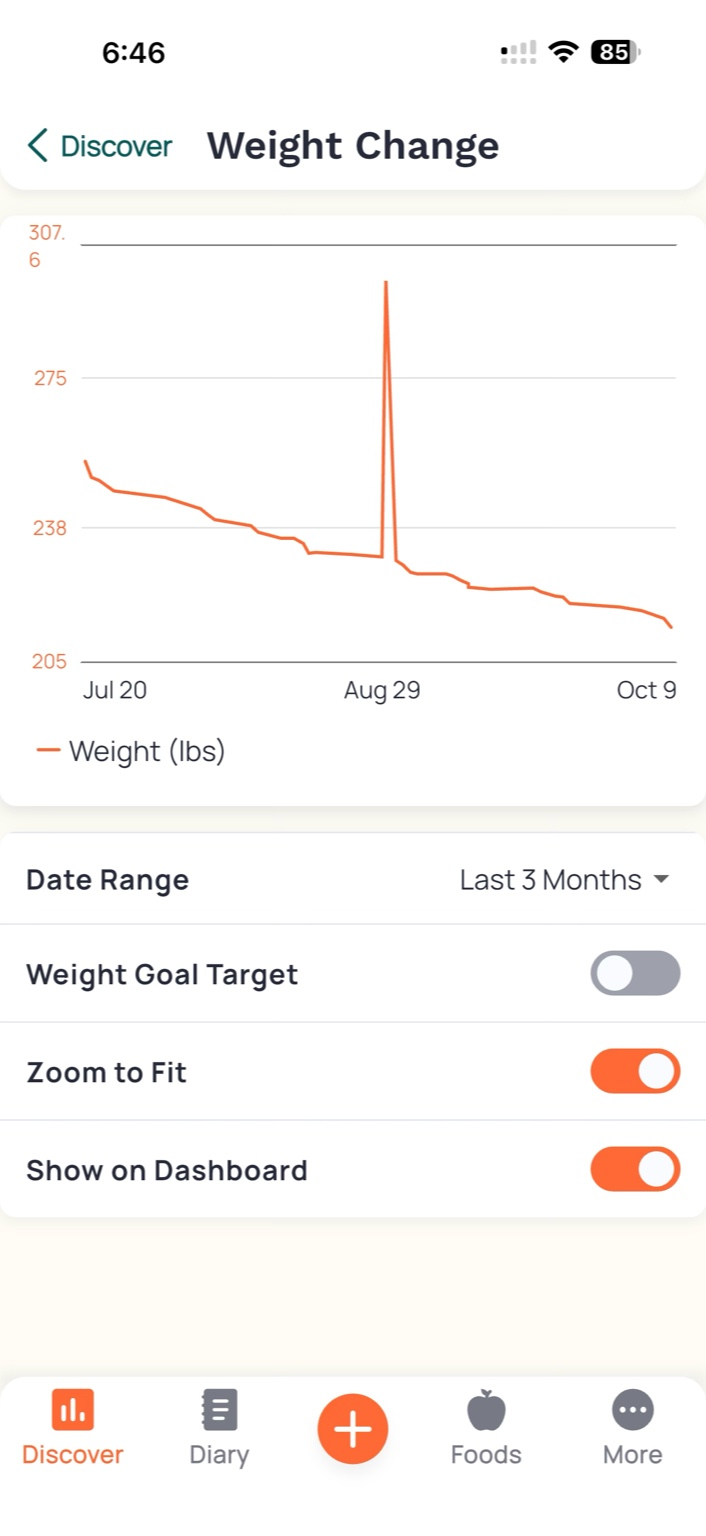
Environment
- iPhone + Apple Watch
- Apple Health integrated with Cronometer
- Data type: HKQuantityTypeIdentifierBodyMass (lbs)
- Time zone: local; no manual overrides
Steps to Reproduce
- Connect Apple Health to Cronometer.
- Ensure normal daily Body Mass samples exist in Health for the period.
- Open Discover → Weight Change (or diary) in Cronometer.
- Observe a single-day value that does not match Health.
- Run Settings → Integrations → Apple Health → Backfill → Weight and reopen the app.
- Issue persists.
Expected
The per-day Body Mass in Cronometer mirrors Apple Health (same value, timestamp bucket, and unit).
Actual
On 2025-08-31, Cronometer displays an incorrect weight (large spike). The value remains after backfill, app relaunch, and device reboot.
What I’ve Verified
- Apple Health shows correct samples (no duplicates), correct Data Source priority (Apple Watch on top), correct units/timestamps.
- Tried disconnect/reconnect + backfill; force-quit; Background App Refresh on; Low Power Mode off.
Questions
- Does Cronometer apply rounding/averaging/dedup or a time-bucket rule that could pick the wrong sample when multiple exist on a day?
- Is there a way to purge and re-import Body Mass for a single date only?
- Any known issues with midnight boundaries, unit conversion (lb↔kg), or timezone offsets for HKQuantityTypeIdentifierBodyMass?
- Do backfills fully honor Health → Data Sources priority?
Happy to provide exact timestamps/values, app build, and iOS/watchOS versions.