How do I view my sugar intake


In an old post, it showed that sugar is a subcategory under carbs in my diary, but the only items I see in my Net Carbs section is what I've consumed and what is remaining. I did go into Settings and make sure Sugars were enabled and I also set up a max # of grams. Thanks for your help
Answers
-
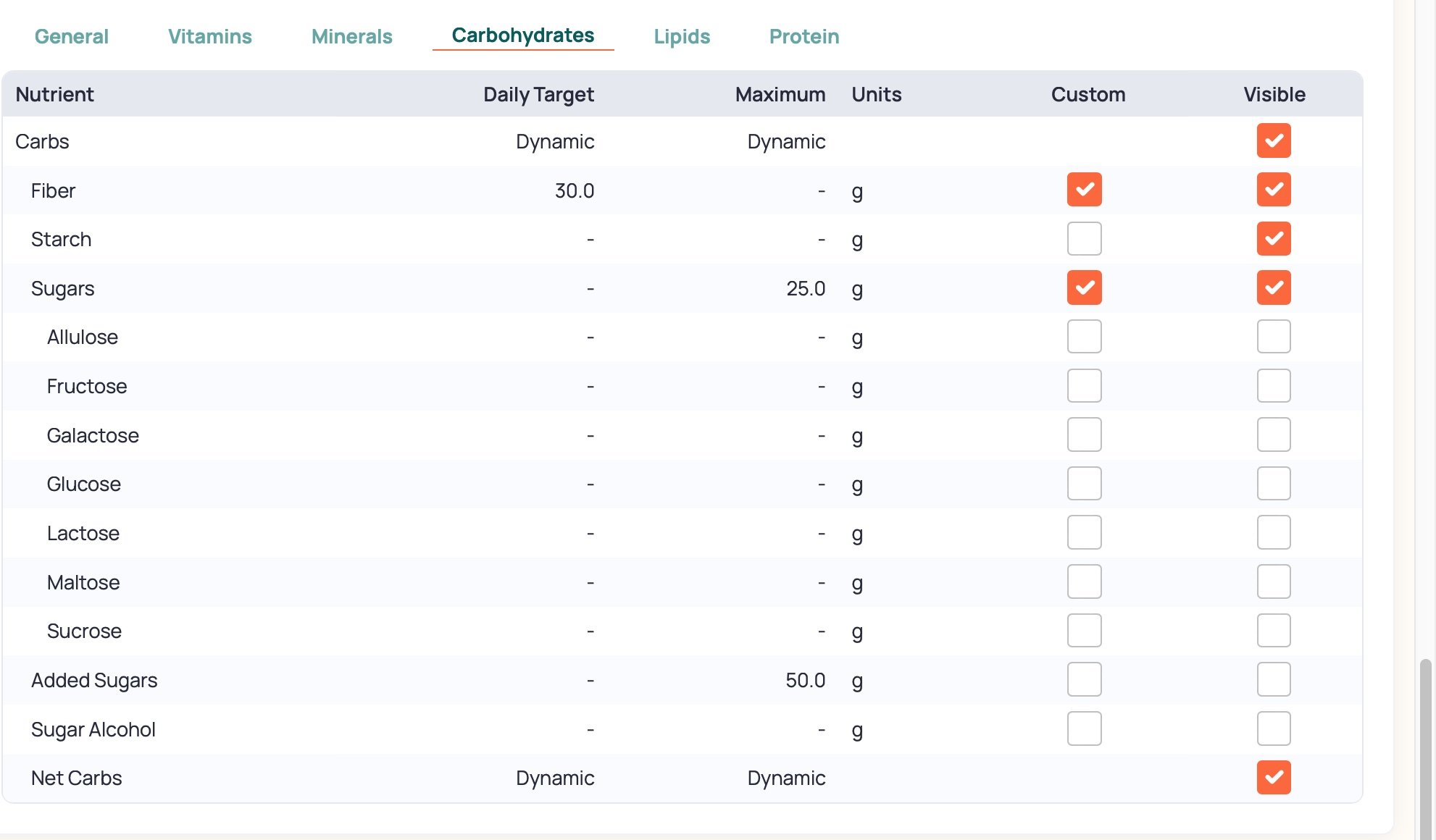
In the setting, go to Carbs and check to see if you toggled on the sugars to "Visible."
-
In the setting, go to Carbs and check to see if you toggled on the sugars to "Visible."
I feel almost silly asking this question, but ... "Where are the 'Settings'?" ... Is this something I do for each food individually? Or is this "Settings" I am having trouble finding for the whole app entirely? I'm used to a Settings gear in other apps but I cannot find one in Cronometer, nor does the word "Settings" appear on any menu I can find.
-
Not a silly question at all. I also don't see any menu for settings.
To make these changes, go to More, then select Targets (might be Targets+Profile on a PC). Select or scroll down to Nutrient Targets and select Carbohydrates, then adjust the sugar settings as desired.
There's also an "Added Sugar" category, if that's what you're trying to limit.